More Than A Plugin: Caching At Every Level
The definition of the noun “cache” is “a secure place of storage”. In web development, keeping copies of data in secure places for future use can make the web a much faster place.
While this post is written in the context of WordPress, but it really applies to nearly every web stack. Within WordPress it’s fairly common to associate the word “caching” with full page cache, or perhaps even simply with “make my site faster”.
There’s much much more that can and should happen however. Let’s take a look.
Page Caching
This is what most people mean when they use the word “caching” in a web context. When a web page is requested, the server makes a complete copy and saves it. The next person to ask for that page gets the saved version.
This can happen in a number of ways. A very common WordPress method is with a plugin like WP Rocket or WP Super Cache. This is a perfectly fine way to get it done, but it still processes PHP code to get the cached file out the door. Ideally the server would simply send the HTML file without any processing at all.
This brings us to custom solutions. Many managed WordPress hosts these days have built in page caching. Exactly what they’re doing is often a mystery since it’s their secret sauce. It might still use PHP or it might not. Results can vary.
Reverse Proxy
This is also full page caching, but it does it by using two web servers in tandem. When a page is requested it goes to a light, speedy web server, often nginx or lighttpd. If it has a a cached copy it’ll send it out, no php processing. It’s very very fast. If it does NOT have a cached version, it’ll ask the back end server for it. This is often Apache, since it’s very powerful, but slower.
Once the front end server gets the page it saves it for the next request.
Browser Cache
Every browser keeps a cache of what it takes in. Full pages, images, CSS files, JavaScript files, fonts, all of it. This is why when you press the back button a page often instantly appears. The issue with this is that by default a browser can decide on its own how long to keep a cache, and when to delete it.
Fortunately, you as a web developer can take control of this. You may want to tell browsers to keep images for weeks or months rather than a few hours. This makes it so your page might load much faster since the browser is using locally cached images.
There are many strategies for what to store, how long, etc., so you should do research on ideal situations, but I’m going to cover a little about how this is managed.
The directives you send to a browser are the same for every browser. How you send them can vary however.
Plugin
Some WordPress plugins like WP Rocket allow you to set expiration times for files. Again, the issue with this model is it uses PHP to do work, and you want to avoid that as much as possible.
.htaccess
The Apache web server allows you to have a file in your home directory called .htaccess (note the dot at the beginning). WordPress uses this for managing permalinks, but you can also directly input the cache directives. They look something like this:
# BEGIN Expire headers
<IfModule mod_expires.c>
  # Turn on the module.
  ExpiresActive on
  # Set the default expiry times.
  ExpiresDefault "access plus 2 days"
  ExpiresByType image/jpg "access plus 1 month"
  ExpiresByType image/svg+xml "access 1 month"
  ExpiresByType image/gif "access plus 1 month"
  ExpiresByType image/jpeg "access plus 1 month"
  ExpiresByType image/png "access plus 1 month"
  ExpiresByType text/css "access plus 1 month"
  ExpiresByType text/javascript "access plus 1 month"
  ExpiresByType application/javascript "access plus 1 month"
  ExpiresByType application/x-shockwave-flash "access plus 1 month"
  ExpiresByType image/ico "access plus 1 month"
  ExpiresByType image/x-icon "access plus 1 month"
  ExpiresByType text/html "access plus 600 seconds"
</IfModule>
# END Expire headers
One issue with this is that not all web servers use .htaccess files. Additionally, if you have nginx sitting in front of Apache for a reverse proxy, even though you set the directives in Apache, nginx isn’t going to send those on.
Talk To Your Host
You don’t necessarily need to understand all this, and even if you do, your host may not allow you to set it up yourself. If you have questions, ask your host. It’s in their best interest to help you.
Browser Cache Summary
Quality browser cache directives have the dual advantage of reducing unnecessary traffic on your server and giving the end user a better experience. They’re worth understanding and configuring.
Transients
Transients are a WordPress function that allow a developer to temporarily store data for quick retrieval. You can read our longer article here. Transients are something only a developer would use, but if you’re not a developer and you hire one, you might ask if they know how to use them properly.
Network Service Provider
This would be a service that stands between your server and the end user. Cloudflare is a common example. They can offer many services like
- Denial of Service protection
- setting browser cache directives
- full page caching
- CDN services
Some of these services are free, some cost money. There are pros and cons to having all of these services in one vendor, you’ll need to do some business planning to see if it’s right for you.
PHP Opcode Caching
A program written in a compiled language like C or Java gets compiled into a binary file. If you want to change it, you have to change the source and recompile. PHP is a scripting language, so the plain text version of the code is what gets run. It does this by having a core program that actually compiles the PHP on the fly, every time it’s requested.
Make no mistake, one of the reasons PHP is successful is that it’s very very good at this. That said, if you can cache that compiled PHP code and re-use it, that would be even faster.
That’s what an opcode cache does.
This is something your host would have to set up for you, or your system administrator if you’re running your own server.
Object Caching
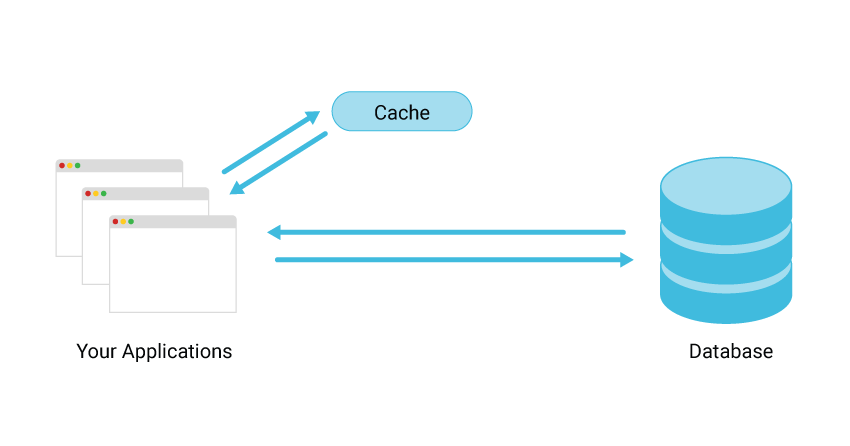
Object caching is storing the results of a database query for future use. WordPress does this natively to a certain extent, but it only saves the objects for the current page load, and then it flushes them. This is great for rendering content more than once on a page, but not much help across multiple page loads.
This is where programs like Redis and Memcached come in. They can save those database results for whatever time you set, which can dramatically speed up your site.
Again, these are programs your host would probably install for you. Once an object cache is installed on the server you need a plugin to connect WordPress to it. Some hosts provide this for you in a custom plugin whilst some will use an off-the-shelf plugin like Redis Object Cache or Object Cache 4 everyone.
Content Delivery Network
A CDN isn’t technically a cache, it’s simply serving some assets from a dedicated, optimized server. This is common with images, video, and audio.
Deleting Your Cache
Something very important in caching is knowing when to flush it. If you make a change to your content, but your caching solution doesn’t know that, site visitors will continue to see the old content.
This requires far more thought and consideration than you might think. With page caching it’s not hard to have you WordPress flush the cache for that page when you update it. But what if you change your CSS, and you told browser caches to keep the old one for 6 months? What if you have quickly changing content like stock information, and your transients are set to live for 20 minutes?
When setting up any caching system, give good thought to when you need to refresh caches.
Summary
A good caching strategy is much much more than simply installing a plugin. It really should be a strategy, thoughtfully planned out. When used properly the performance improvements can be dramatic, but when used thoughtlessly they can make your site nearly useless.
It’s also important to remember you don’t need to use every method possible. If you pay a developer thousands of dollars to load your site up with transients and you lose 1/100 of a second in page load time, was it really worth it? On a site like Amazon, probably. On my personal Winnie-the-Pooh fan site, probably not.
You also don’t need to understand it all yourself. There are developers who specialize in caching, it’s perfectly fine to ask them to craft a caching strategy and then implement it.
Whatever your choice, may your sites be ever faster!
The post More Than A Plugin: Caching At Every Level appeared first on Performance Hub.